Software › DigSig
DigSig
Photo & Video Slideshow for iPad
Turn any iPad into a dedicated photo and video slideshow display — for a digital photo frame, a reception desk, a shop window, or anywhere you want your own media on a loop.
DigSig plays entirely from photos and videos you import yourself. There’s no cloud account, no ads, and nothing ever leaves your device.
Version 1.1 · Designed for iPad · Requires iPadOS 16.0 or later · Age rating 4+
What it does
Your media, your folders
Import photos (JPEG, PNG, HEIC, TIFF, GIF) and videos (MP4, MOV, M4V) straight from Files. Organise them into folders and build as many playlists as you need.
Transitions that suit the room
Four styles: a slow Ken Burns pan and zoom, crossfade, hard cut, or fade to black. Fill, fit or stretch to match your screen.
Brand it with an overlay
Drop in your own transparent PNG frame or logo and attach it to any playlist — useful for shop windows and reception screens.
Schedule by clock or by sun
Trigger playlists at set times, or relative to local sunrise and sunset, on the days of the week you choose.
Dims itself when it should
Auto-dim at night, or automatically when nobody is nearby — detected on-device, with nothing recorded.
Hands-off playback
Fullscreen, no chrome, no distractions. Start a playlist by voice with Siri Shortcuts; hold the screen for three seconds to exit.
Halloween Ghost (new in 1.1)
Happy Halloween! Turn it on in Settings and, whenever someone leans in close and looks at your iPad, a friendly ghost pops up over your slideshow with a big “BOOO!!!” and a spooky boo sound — then your slideshow carries on right where it left off. Perfect for a market stall, a shop window, or trick-or-treaters at the door. Adjustable sensitivity, your own picture and sound if you’d rather not use the built-in ghost, and a preview button so you can see and hear it without the camera. Off by default; it uses the front camera only while a slideshow is playing, and nothing is ever recorded or stored.
Privacy by design
DigSig doesn’t collect, transmit, or share any data. Your media, playlists and settings stay on your iPad. Camera and location access are both optional, used only for on-device presence detection, the Halloween Ghost surprise, and sunrise/sunset calculation — nothing is ever recorded or sent anywhere.
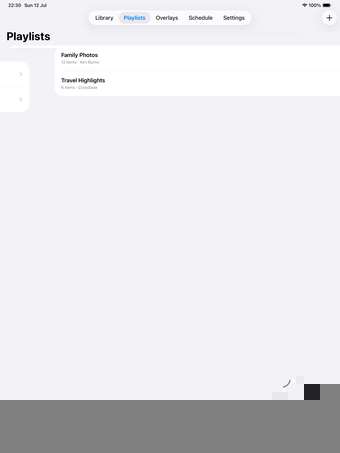
Screenshots





Requirements
-
iPad running iPadOS 16.0 or later -
Works on iPad Pro (1st generation, 2015/2016) and newer -
Designed for iPad — not a universal iPhone app -
Photos: JPEG, PNG, HEIC, TIFF, GIF -
Video: MP4, MOV, M4V -
Camera access optional (presence dimming and Halloween Ghost) -
Location access optional (sunrise/sunset only)
What’s new
1.1
Happy Halloween! DigSig now has a friendly ghost. Turn on Halloween Ghost in Settings and, whenever someone leans in close and looks at your iPad, a cute ghost pops up over your slideshow with a big “BOOO!!!” and a spooky boo sound, then your slideshow carries on right where it left off. Adjustable sensitivity, your own picture and sound, an option to show or hide the “BOOO!!!” text, and a preview button to try it without the camera. Off by default. While it’s on, “Dim When No One’s Around” is paused and comes back when you turn the ghost off.
1.0
Initial release: import your own photos and videos, build playlists with transitions and overlays, schedule playback by time or sunrise/sunset, and enjoy distraction-free fullscreen slideshow playback.
Support & legal
These are the URLs submitted to App Store Connect. Keep them live.